Introduction
Bareos is a set of computer programs that permits the system administrator to manage backup, recovery, and verification of computer data across a network of computers of different kinds. Bareos can also run entirely upon a single computer and can backup to various types of media, including tape and disk.
In technical terms, it is a network Client/Server based backup program. Bareos is relatively easy to use and efficient, while offering many advanced storage management features that make it easy to find and recover lost or damaged files. Due to its modular design, Bareos is scalable from small single computer systems to systems consisting of hundreds of computers located over a large network.
BareOS Architecture
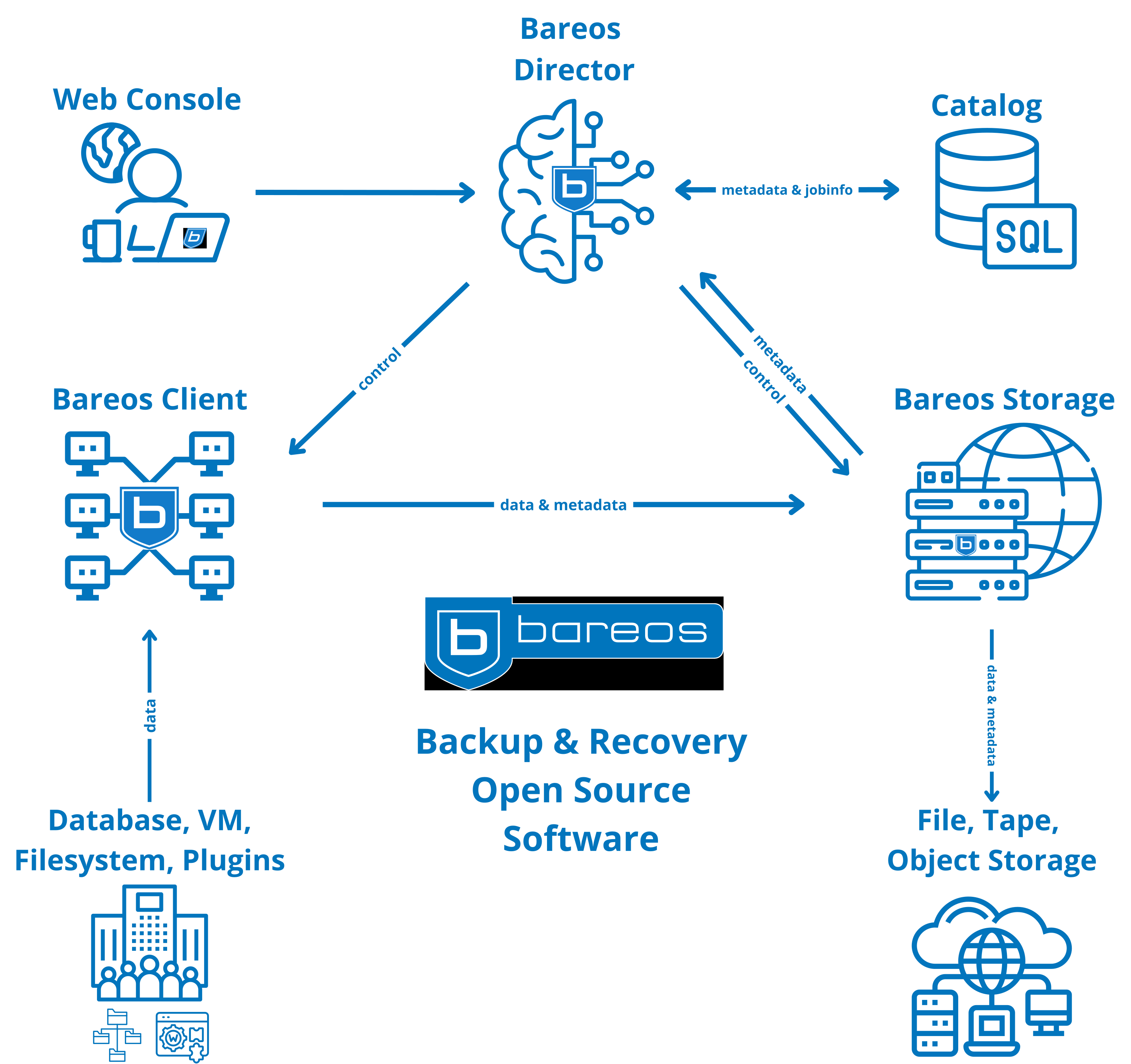
This diagram shows the Bareos (Backup Archiving Recovery Open Source) architecture and how its main components interact during backup and restore operations.
Main Components
Bareos Director (Central Brain)
-
Acts as the
control and coordination service -
Schedules jobs, manages policies, and controls all components
-
Communicates with:
Catalogfor job and file metadataBareos Clientsto start backups/restoresBareos Storageto manage where data is written
Web Console
-
Browser-based management interface
-
Used by administrators to:
- Configure jobs
- Monitor backups
- Start restores
- View reports
-
Sends commands directly to the
Director
Catalog (SQL Database)
-
Stores
metadata and job information, such as:- File indexes
- Backup history
- Volume locations
-
Does
not store actual backup data -
Queried by the Director for restores and reporting
Bareos Client (File Daemon)
-
Installed on systems being backed up
-
Collects data from:
- Databases
- Virtual machines
- Filesystems
- Plugins (application-aware backups)
-
Sends backup data to
Bareos Storage -
Receives control instructions from the
Director
Bareos Storage (Storage Daemon)
-
Handles
physical storage of backup data -
Supports multiple storage targets:
- Disk files
- Tape libraries
- Object storage (cloud)
-
Receives metadata and control commands from the Director
-
Stores actual backup data coming from Clients
Resources: