GitOps with ArgoCD
Production Purpose: GitOps means Git is the single source of truth for your cluster state. You never
kubectl applydirectly in production — instead, you push to Git, and ArgoCD automatically detects and syncs the changes. This gives you full audit trail, rollback history, and drift detection for free.
GitOps Principles
GitOps vs Traditional Deployment
| Aspect | Traditional | GitOps |
|---|---|---|
| Deploy method | kubectl apply manually | ArgoCD syncs from Git |
| Audit trail | Shell history | Git commit history |
| Rollback | Remember exact state | git revert |
| Drift detection | None | ArgoCD alerts on drift |
| Access control | Who has kubectl | Who has Git write access |
| Multi-env promotion | Manual, error-prone | Git branch per environment |
Repository Structure
Organize your Git repo like this:
sample-app/                        ← Application code
├── app/
├── Dockerfile
└── ...

k8s-manifests/                     ← Kubernetes manifests (separate repo)
├── base/
│   ├── laravel/
│   │   ├── deployment.yaml
│   │   ├── service.yaml
│   │   └── ingress.yaml
│   ├── mariadb/
│   │   └── statefulset.yaml
│   └── redis/
│       └── deployment.yaml
├── overlays/
│   ├── staging/
│   │   └── kustomization.yaml
│   └── production/
│       └── kustomization.yaml
└── apps/
    ├── laravel-app.yaml           ← ArgoCD Application CRD
    └── monitoring.yaml
ArgoCD watches the k8s-manifests repo. Your app code repo is separate.
Install ArgoCD
kubectl create namespace argocd

kubectl apply --server-side -n argocd \
  -f https://raw.githubusercontent.com/argoproj/argo-cd/stable/manifests/install.yaml
Wait for all ArgoCD pods to start:
kubectl wait --namespace argocd \
  --for=condition=ready pod \
  --selector=app.kubernetes.io/name=argocd-server \
  --timeout=120s
Expose ArgoCD via Ingress
Create: argocd-ingress.yaml
apiVersion: networking.k8s.io/v1
kind: Ingress
metadata:
  name: argocd-ingress
  namespace: argocd
  annotations:
    nginx.ingress.kubernetes.io/ssl-passthrough: "true"    # ArgoCD uses its own TLS
    nginx.ingress.kubernetes.io/backend-protocol: "HTTPS"
spec:
  ingressClassName: nginx
  rules:
  - host: argocd.local
    http:
      paths:
      - path: /
        pathType: Prefix
        backend:
          service:
            name: argocd-server
            port:
              number: 443
Apply:
kubectl apply -f argocd-ingress.yaml
Add to your laptop's /etc/hosts:
192.168.90.100 argocd.local
Get Initial Admin Password
kubectl get secret argocd-initial-admin-secret \
  -n argocd \
  -o jsonpath="{.data.password}" | base64 -d && echo
Output:
SomeRandomGeneratedPassword123
Login at: https://argocd.local
Username: admin
Password: (from above)
Install ArgoCD CLI
curl -sSL -o argocd https://github.com/argoproj/argo-cd/releases/latest/download/argocd-linux-amd64
chmod +x argocd && sudo mv argocd /usr/local/bin/
Login via CLI:
argocd login argocd.local --username admin --password <your-password> --insecure
Create ArgoCD Application (Laravel)
Create: argocd-laravel-app.yaml
apiVersion: argoproj.io/v1alpha1
kind: Application
metadata:
  name: laravel-production
  namespace: argocd
  finalizers:
  - resources-finalizer.argocd.argoproj.io   # Cleanup resources when App is deleted
spec:
  project: default

  source:
    repoURL: https://github.com/pndhkm/sample-app
    targetRevision: main
    path: k8s/production                      # Path inside the repo with K8s manifests

  destination:
    server: https://kubernetes.default.svc    # This cluster
    namespace: production

  syncPolicy:
    automated:
      prune: true          # Delete resources removed from Git
      selfHeal: true       # Revert manual kubectl changes (drift correction)
    syncOptions:
    - CreateNamespace=true
    - PrunePropagationPolicy=foreground
    retry:
      limit: 3
      backoff:
        duration: 5s
        factor: 2
        maxDuration: 3m
Apply:
kubectl apply -f argocd-laravel-app.yaml
Add Kubernetes Manifests to Your Repo
In your sample-app repository, create the k8s/production/ directory:
Create: k8s/production/kustomization.yaml
apiVersion: kustomize.config.k8s.io/v1beta1
kind: Kustomization

namespace: production

resources:
- deployment.yaml
- service.yaml
- ingress.yaml
- configmap.yaml

images:
- name: panduhakam/sample-app
  newTag: "v1"                    # ArgoCD + CI will update this tag
Push to GitHub:
git add k8s/
git commit -m "feat: add kubernetes production manifests"
git push origin main
ArgoCD will detect the change within 3 minutes (default poll interval) and sync.
Watch ArgoCD Sync
Via CLI
argocd app get laravel-production
argocd app sync laravel-production    # Manual sync (usually automatic)
Output:
Name:               laravel-production
Project:            default
Server:             https://kubernetes.default.svc
Namespace:          production
URL:                https://argocd.local/applications/laravel-production
Repo:               https://github.com/pndhkm/sample-app
Target:             main
Path:               k8s/production
SyncStatus:         Synced
HealthStatus:       Healthy
Via UI
The ArgoCD UI shows a live graph of all Kubernetes objects and their health.
CI/CD Integration (GitHub Actions)
Create: .github/workflows/deploy.yaml
name: Build and Deploy

on:
  push:
    branches: [main]

jobs:
  build-and-deploy:
    runs-on: ubuntu-latest
    steps:
    - uses: actions/checkout@v4

    - name: Build Docker image
      run: |
        docker build -t panduhakam/sample-app:${{ github.sha }} .

    - name: Push to Docker Hub
      env:
        DOCKER_PASSWORD: ${{ secrets.DOCKER_PASSWORD }}
      run: |
        echo $DOCKER_PASSWORD | docker login -u panduhakam --password-stdin
        docker push panduhakam/sample-app:${{ github.sha }}

    - name: Update Kubernetes manifests
      run: |
        # Update the image tag in kustomization.yaml
        sed -i "s/newTag: .*/newTag: \"${{ github.sha }}\"/" k8s/production/kustomization.yaml
        git config user.name "GitHub Actions"
        git config user.email "actions@github.com"
        git add k8s/production/kustomization.yaml
        git commit -m "ci: update image tag to ${{ github.sha }}"
        git push
Full GitOps Flow
Rollback a Bad Deployment
Via ArgoCD UI
-
Open
https://argocd.local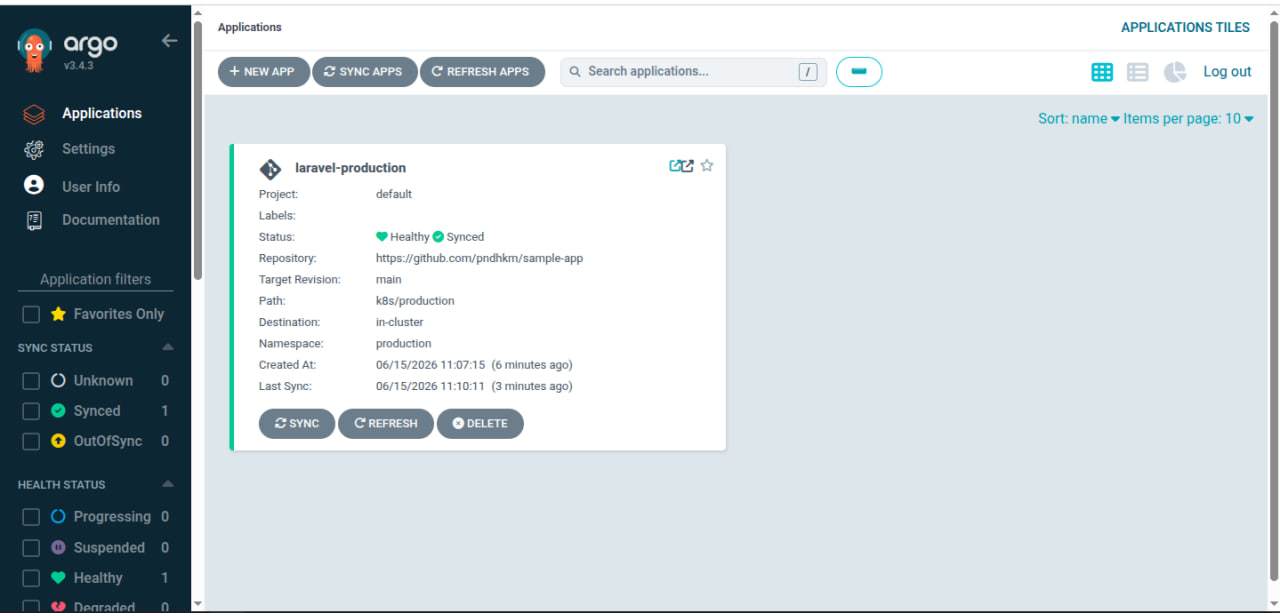
-
Select the
laravel-productionapplication.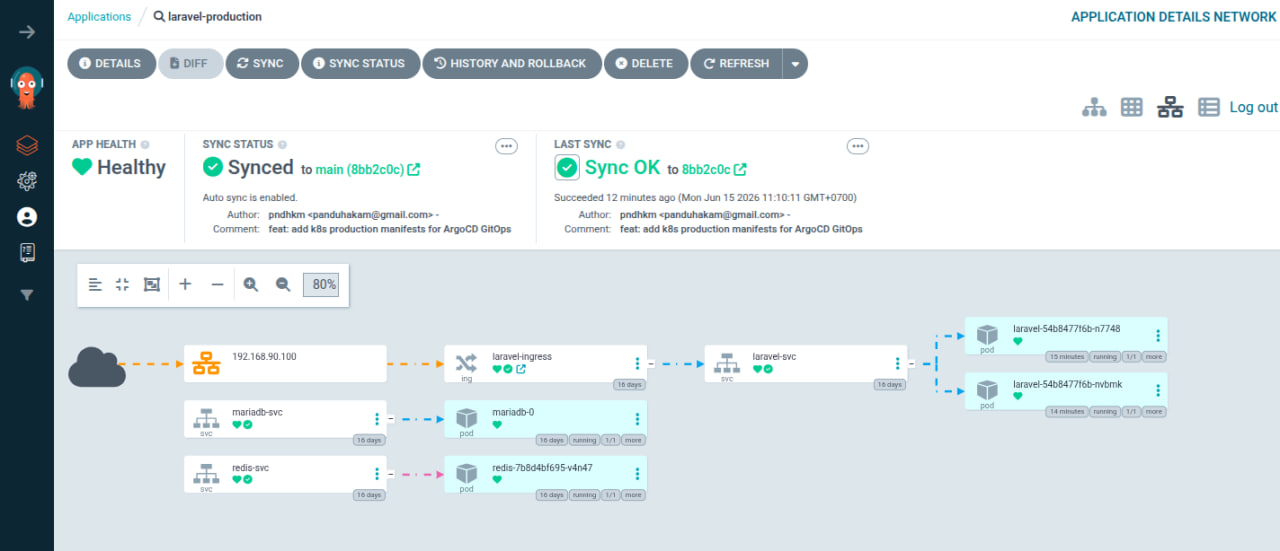
-
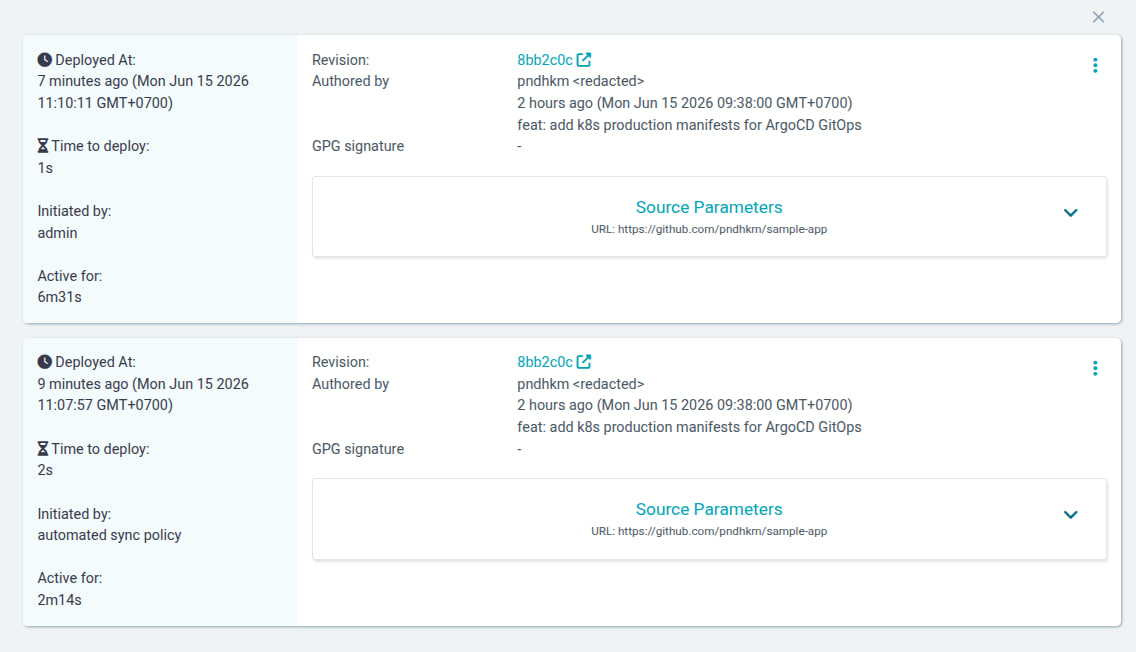
Navigate to the History and Rollback tab.
-
Select the last known good revision.
-
Click the three-dot menu (⋮) next to the selected revision, then choose Rollback.
Via CLI
# List sync history
argocd app history laravel-production

# Rollback to previous revision
argocd app rollback laravel-production <REVISION-ID>
This reverts Git to the previous commit's state — proper rollback.
Troubleshooting
| Symptom | Cause | Fix |
|---|---|---|
App shows OutOfSync | Manual kubectl change made | Let ArgoCD self-heal, or sync manually |
App shows Degraded | Pod health failing | Check pod logs and events |
| ArgoCD can't pull from private repo | No credentials | Add repo via argocd repo add with SSH key |
| Sync fails on resource conflict | Existing resources not owned by ArgoCD | Add argocd.argoproj.io/managed-by: argocd annotation |
selfHeal reverts your changes | selfHeal: true is set | This is correct behavior — change Git instead |
Connect ArgoCD to Private GitHub Repo
argocd repo add git@github.com:pndhkm/sample-app.git \
  --ssh-private-key-path ~/.ssh/id_rsa \
  --name sample-app
Production Best Practices
| Practice | Reason |
|---|---|
| Separate app code and manifests repos | Clean separation of concerns |
Enable selfHeal: true | Prevents configuration drift |
Enable prune: true | Removes orphaned resources automatically |
| Use Kustomize overlays per environment | Share base manifests, override per env |
| Use ArgoCD Projects | Restrict which repos/namespaces each team can deploy |
| Set up SSO (OIDC) | Don't use local ArgoCD admin in production |
| Use Sealed Secrets | Safe to commit encrypted Secrets to Git |